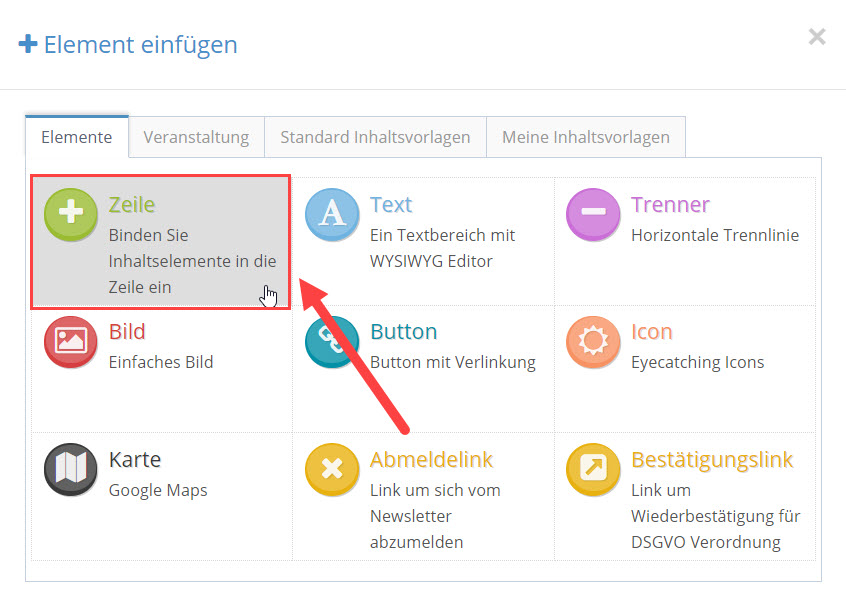
Um ein Reihen-Element einzufügen klicken Sie unter dem Reiter “Elemente” auf das Zeile-Symbol.
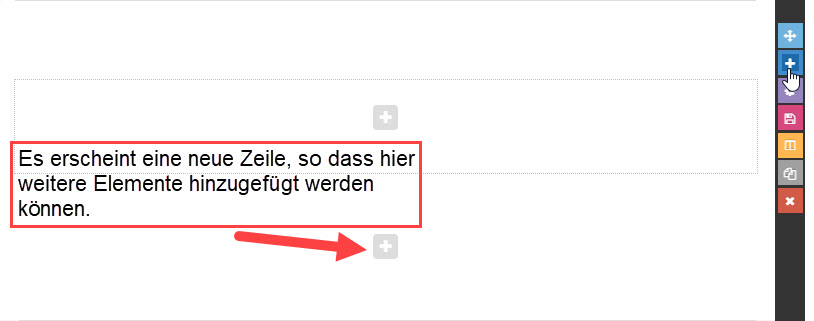
Sobald Sie auf das Zeile-Symbol geklickt haben, erscheint eine neue Zeile unter Ihrer bereits bestehenden Reihe.

Um ein Reihen-Element einzufügen klicken Sie unter dem Reiter “Elemente” auf das Zeile-Symbol.
Sobald Sie auf das Zeile-Symbol geklickt haben, erscheint eine neue Zeile unter Ihrer bereits bestehenden Reihe.
You need to load content from reCAPTCHA to submit the form. Please note that doing so will share data with third-party providers.
More InformationYou are currently viewing a placeholder content from Turnstile. To access the actual content, click the button below. Please note that doing so will share data with third-party providers.
More InformationYou are currently viewing a placeholder content from Vimeo. To access the actual content, click the button below. Please note that doing so will share data with third-party providers.
More InformationYou are currently viewing a placeholder content from YouTube. To access the actual content, click the button below. Please note that doing so will share data with third-party providers.
More InformationYou need to load content from reCAPTCHA to submit the form. Please note that doing so will share data with third-party providers.
More InformationYou are currently viewing a placeholder content from Facebook. To access the actual content, click the button below. Please note that doing so will share data with third-party providers.
More InformationYou are currently viewing a placeholder content from Instagram. To access the actual content, click the button below. Please note that doing so will share data with third-party providers.
More InformationYou are currently viewing a placeholder content from X. To access the actual content, click the button below. Please note that doing so will share data with third-party providers.
More Information